
How to Get Unbanned from OnlyFans
Getting banned from OnlyFans can be frustrating, especially if you’re unsure why it happened. Whether you’re a content creator or subscriber, an account ban can disrupt your activities and leave you searching for solutions. This guide will walk you through the steps to understand your ban, appeal it, and ensure it doesn’t happen again.
1. Introduction
OnlyFans is a platform that prioritizes safe interactions and compliance with its Terms of Service (ToS). However, account bans still occur, often due to rule violations or system flags.
Common concerns for banned users include:
- Can I recover my account?
- What steps do I need to take?
- How can I avoid being banned again?
Understanding the reasons behind OnlyFans bans and knowing how to take corrective action is crucial.
2. Common Reasons for OnlyFans Bans
If you’ve been banned, here are the most common causes to consider:
Violating Terms of Service
OnlyFans has strict guidelines about prohibited content, copyright infringement, and harassment. Violating these rules is a major reason for account bans. Examples include:
- Sharing illegal or prohibited content.
- Engaging in abusive behavior with other users.
Chargebacks and Payment Disputes
Frequent refund requests or chargebacks might lead OnlyFans to block your account. These flags appear as potential fraud, even when unintentional.
Suspicious Activity
Accessing your account from multiple locations, using bot-like behavior, or inconsistent login patterns can trigger automatic account suspension.
Using Banned IPs or Proxies
If you access OnlyFans through flagged IP addresses (often associated with free or low-quality proxies), your account might be restricted. High-risk IPs are often linked with suspicious or harmful activity.
3. Steps to Get Unbanned from OnlyFans
If your account has been banned, follow these steps to recover it:
3.1. Contact OnlyFans Support
Your first course of action is to appeal the ban. Here’s how:
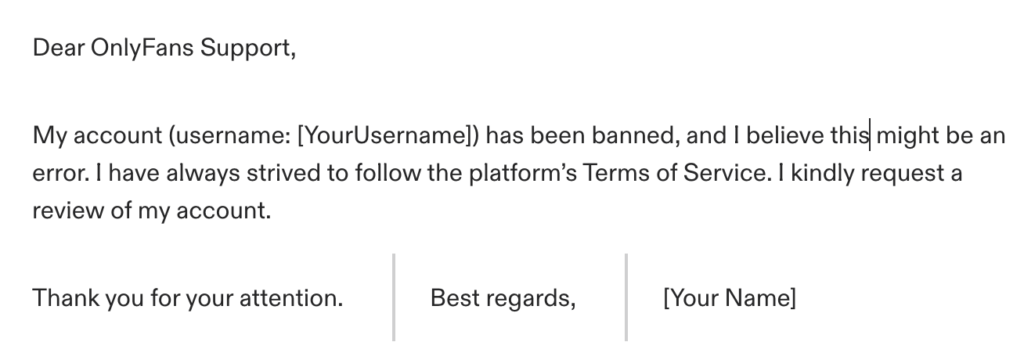
- Email Format for Appeal:
Send an email to support@onlyfans.com with the subject line “Account Ban Appeal.”
Include details like:
- Your registered email address and username.
- A polite explanation disputing the ban and ensuring compliance in the future.
Example:
- Timeline: Expect a response within 72 hours, but follow up if necessary.
3.2. Change Your IP Address
If your ban was caused by IP blacklisting or a flagged connection:
- Restart your router to get a new IP (if your ISP uses dynamic IPs).
- Switch to mobile data—this often provides a fresh, clean IP.
- Use a reliable residential or mobile proxy (details below).
3.3. Use a Reliable Proxy or VPN
Using a secure and undetectable connection helps avoid future bans.
- Avoid Free Proxies/VPNs: These are often blacklisted by OnlyFans.
- Residential Proxies: Mimic real user IPs, reducing detection.
- Mobile Proxies: Provides IPs from mobile networks for better stealth.
To configure a proxy, install it on your browser or device and ensure it’s connected to a high-reputation service like Bright Data or Oxylabs. More proxy providers reviews can be found here.
3.4. Create a New OnlyFans Account (If Necessary)
If your appeal is unsuccessful, you may need to start fresh.
- Use a different email and payment method when signing up.
- Access the site via a new device or one with cleared cookies to avoid connection to your previous account.
- Ensure your IP address is clean by using a safe network or premium proxy.
4. Best Practices to Avoid Future Bans
Once you regain access (or create a new account), follow these tips to stay compliant:
Follow OnlyFans Rules
- Familiarize yourself with the Terms of Service.
- Avoid prohibited content or interactions that could result in flags.
Be Mindful of Your IP Address
- Use trusted residential or mobile networks when accessing OnlyFans.
- Avoid public Wi-Fi or free proxies that can trigger blocks.
Minimize Suspicious Activity
- Don’t log in from multiple devices or locations too often.
- Avoid automated tools for logging in, sending messages, or completing transactions.
Keep Payment Records Clean
- Avoid chargebacks or disputes with OnlyFans payments.
By adhering to these steps, you’ll minimize your risk of future bans and ensure a seamless experience on the platform.
5. Conclusion
Getting unbanned from OnlyFans requires strategic action and a commitment to following the platform’s rules. Here’s a quick recap of the steps to take:
- Contact OnlyFans Support and submit an appeal.
- Change your IP address or use a proxy to ensure secure login.
- Create a new account if needed and avoid linking it to your banned account.
- Follow best practices to prevent future issues.
Remember, a well-configured proxy or secure VPN can be your best ally in maintaining access to OnlyFans while protecting your connection and data. Take proactive steps today to enjoy all the benefits OnlyFans has to offer without interruptions!
For more tips and tools to manage your OnlyFans account, check out our other guides.
Table of Contents

Matthew Williams
Proxy and tech enthusiast